Playbook
Is Your Insurance Agency's WordPress Site a Security Risk?
Usually, yes, and not because of WordPress itself. The risk lives in the plugins nobody has updated since the person who built your site moved on, and in the quote form quietly storing client health details in a database anyone on the internet can knock on.


21 min read
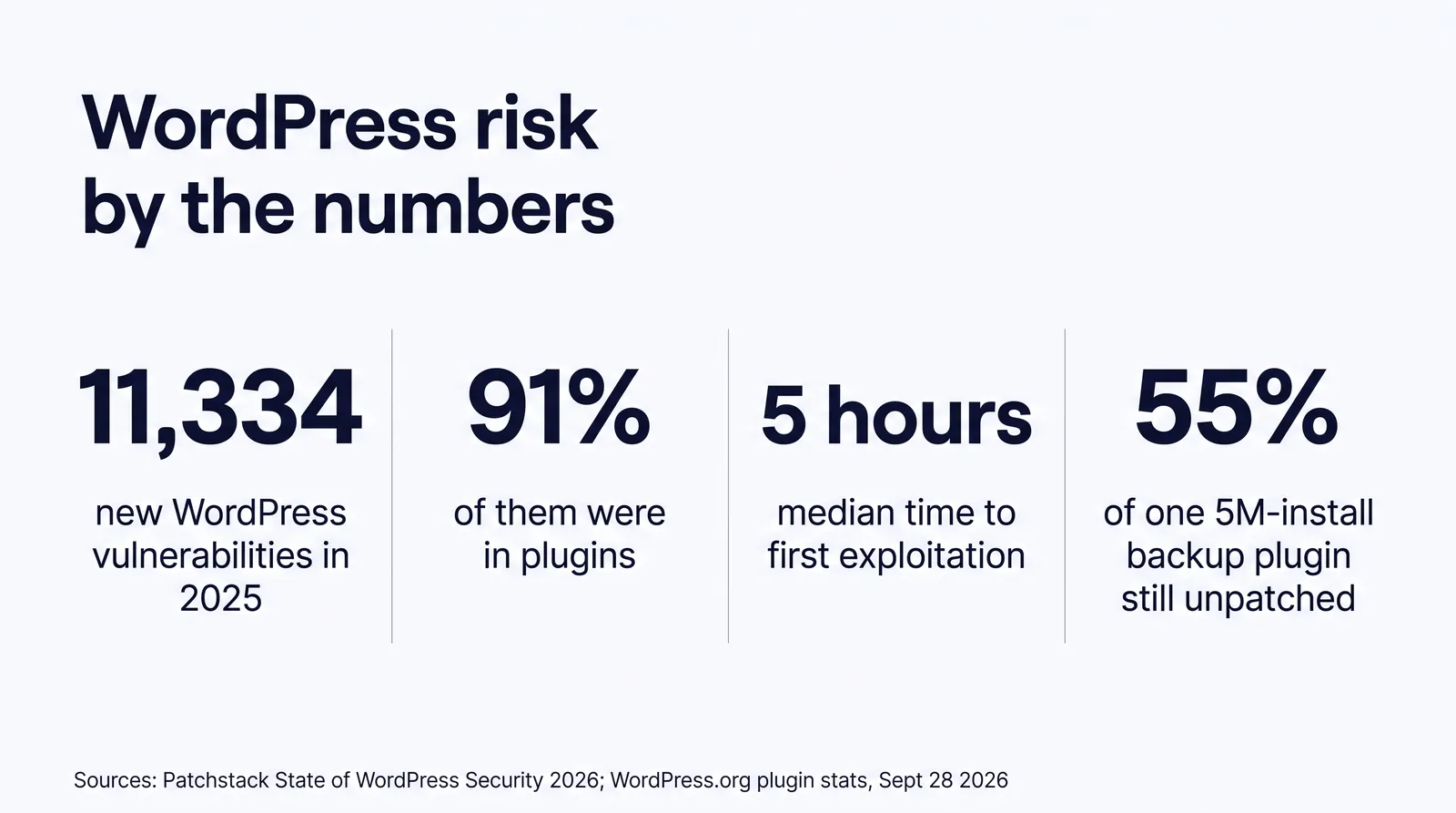
The insurance agency WordPress security risk is real, and it's almost all plugins. Patchstack counted 11,334 new WordPress vulnerabilities in 2025, 91% of them in plugins, with a weighted median of 5 hours from disclosure to first exploit.1 On September 28, 2026, 55% of installs of one 5 million install backup plugin were still on a version older than the fix for a high severity flaw, 39 days after the patch shipped.3 If you hold a license in one of the 28 jurisdictions that adopted the NAIC data security model, a breach can start a 72 hour clock to notify your commissioner.78 You can harden WordPress yourself. Or you can run a static site that has no plugins, no database, and no public login to attack.
The update notices you have been ignoring
Yes, for most agencies an unattended WordPress site is a security risk, and the reason is the plugins. WordPress runs 40.2% of all websites on the internet as of September 28, 2026, according to W3Techs,6 which makes it the default choice for the web designer your agency hired three years ago. That designer installed a theme, a page builder, a form plugin, a backup plugin, an SEO plugin, a slider, maybe a chat widget. Then the site went live, the invoice got paid, and nobody logged into the dashboard again.
If you log in today, you'll probably see it: a red badge on the Plugins menu, a banner about a new WordPress version, a notice that your theme has an update. Most agency owners have seen that screen and closed the tab, because the last time someone clicked "update all" the homepage broke for a day. That's a reasonable instinct. It's also how sites get taken over.
Here's the version of this problem agents actually describe. A client calls to say Google showed a warning when they searched your agency name. Or your quote form stopped sending leads and nobody noticed for two weeks. Or a prospect mentions that your site redirected their phone to a page selling something that has nothing to do with Medicare. Each one usually traces back to a plugin that had a known fix available for weeks.
Before you keep reading
Log into your site's dashboard and count the plugins, active and inactive. Write the number down. You'll use it in the fix section. If you want an outside read of how your site scores on speed, AI citations, and tracking safety while you're at it, the free Audit runs in about a minute.
Why agency WordPress sites get hacked through plugins
WordPress sites get hacked mainly through third party plugins and themes, not WordPress itself. Patchstack's State of WordPress Security in 2026 whitepaper, covering calendar year 2025, found 11,334 new vulnerabilities across the WordPress ecosystem, a 42% increase over 2024. Of those, 91% were in plugins and 9% in themes. WordPress core accounted for just 6, all rated low priority.1
That split tells you where to look. The software maintained by the WordPress project is in good shape. The software your designer bolted on is where the holes are, and your agency site probably runs more of it than you think.
The mechanism: a dynamic site runs code on every visit
A standard WordPress site doesn't store finished pages. When a visitor asks for your Medicare page, the server runs PHP, loads WordPress, loads your theme, loads every active plugin, queries a MySQL database for the content, assembles the HTML, and sends it back. Every one of those plugins is code executing on your server, on every request, with access to your database. One plugin with a flaw in how it handles input is enough.
Two things make that worse on agency sites. The login page sits at a predictable address, so anyone can try passwords against it. And many form plugins keep a copy of every submission in the site's own database, so your quote form entries sit right next to the content an attacker is already poking at.
The race you're losing: fix time versus exploit time
The speed numbers are what make this urgent. Patchstack reports that 46% of the vulnerabilities it tracked in 2025 were not fixed in time for public disclosure, meaning there was no patch to install when the world learned about the hole. For the vulnerabilities attackers actually went after, the weighted median time to first exploit was 5 hours.1 That's a single source, Patchstack's own exploit data, and we haven't found a second independent dataset measuring the same thing, so treat it as one firm's measurement rather than a law of nature. Even so, compare it with how often your site gets updated. If the honest answer is "whenever someone remembers," you're measuring your exposure in months against an attack window measured in hours.
Hosting doesn't close that gap by itself either. Patchstack tested hosting level defenses and found that only 26% of total attacks were blocked, and traditional defenses blocked just 12% of WordPress specific vulnerability attacks.1 Your host's firewall helps. It isn't a plan.
The software maintained by the WordPress project is in good shape. The software your designer bolted on is where the holes are.
One plugin, five million sites, and a 39 day patch gap
The clearest current example is CVE-2026-19949, a high severity flaw in All-in-One WP Migration and Backup, a plugin WordPress.org lists at 5+ million active installations.3 The National Vulnerability Database describes it as an unauthenticated SQL injection in the archive restore function, affecting every version up to and including 7.109, which can be used to extract the plugin's secret key when an administrator runs a restore and then achieve remote code execution. Wordfence, the CVE numbering authority that filed it, scored it 8.8 out of 10.2
In plain terms: an attacker without an account can plant something in your database, wait for you to run a routine restore or migration, and take control of the site. The plugin you installed to be responsible becomes the way in.
| Date (2026) | What happened | Record |
|---|---|---|
| August 15 | CVE ID reserved by Wordfence | CVE.org and NVD record2 |
| August 20 | Fixed version 7.110 added to the WordPress.org plugin repository | WordPress.org plugin Trac log4 |
| August 25 | CVE published, CVSS 3.1 score 8.8 (High), versions up to 7.109 affected | NVD2 |
| September 15 | Version 7.111 released | WordPress.org plugin repository3 |
| September 28 | 55.04% of installs still on a version older than 7.110 | WordPress.org plugin stats API, pulled for this guide3 |
That last row is the one to sit with. We pulled WordPress.org's public version statistics for the plugin on September 28, 2026, 39 days after the fix landed. Version 7.111 accounted for 34.64% of installs and version 7.110 for 10.32%, so 44.96% were on a patched release. The other 55.04%, version 7.105 at 5.26% plus every older version at 49.78%, were still on code the NVD lists as affected.3 Applied to the 5 million installation floor WordPress.org reports, that's roughly 2.75 million sites, and since "5+ million" is a floor, the real number is likely higher.
A fair caveat: the NVD record also carries a CISA coordinator assessment that, as of August 27, 2026, listed exploitation as "none" and the flaw as not automatable, and the attack requires an administrator to run a restore.2 So this isn't a flaw that empties every unpatched site overnight. It's a clean illustration of the pattern, though. A fix existed within days. Most sites didn't take it for weeks. That gap between "patch available" and "patch installed" is where agency sites get hurt, and it repeats with every plugin you run.
How much of WordPress is running old code right now
A large share of WordPress sites run an outdated core version, not just outdated plugins. WordPress.org's public version statistics, pulled September 28, 2026, show 58.81% of sites on the current 7.1 branch, which means 41.19% are on an older major release. The current release offered by WordPress.org's update service on that date was 7.1.2.5
| Core branch | Share of sites | What it means |
|---|---|---|
| 7.1 (current) | 58.81% | On the current major release |
| 7.0 | 10.55% | One major release behind |
| 6.9 | 7.46% | Two major releases behind |
| 6.8 | 5.70% | Three major releases behind |
| 6.7 and older | 17.49% | Four or more releases behind; 7.69% are still on a 5.x or older branch |
Core version isn't a perfect proxy for plugin hygiene, and WordPress backports security fixes to some older branches, so being on 7.0 isn't the same as being unpatched. But it's a reliable tell. A site that's four major versions behind on core almost never has current plugins. Nobody is logging in.
Put the two data points side by side. The software gets new holes at a rate of 11,334 a year across the ecosystem,1 and a large minority of sites don't take updates even at the core level.5
What a hacked agency website actually costs
A hacked agency website costs you in four places: search visibility, lost leads, cleanup, and regulatory exposure if client data was on the site. Google says pages or sites affected by a security issue can appear with a warning label in search results or an interstitial warning page in the browser, and that a review after you clean up can take from a few days to a few weeks to complete.9
Search and AI visibility
Think about what a warning label does to an agency that depends on people searching its name. A prospect who got your name from a friend searches it, sees a warning, and calls the next agent. Google's own Security Issues report lists the categories it flags, including hacked malware, code injection, content injection, URL injection, and deceptive pages.9 Content and URL injection are the quiet ones: spam pages added to your domain that you never see, which dilute everything you've built and can sit there for months.
Leads you never see
The most common complaint we hear isn't a dramatic defacement. It's "the form stopped working." Compromised sites often have their mail settings or form handlers altered, or get blocklisted by email providers because the server started sending spam. During AEP or open enrollment, two weeks of silently lost quote requests is a meaningful hit to a small agency's year, and you usually find out from a client, not from the site.
Breach economics
Breaches are expensive at every scale, though the big published averages come from larger organizations. IBM's Cost of a Data Breach Report 2026, conducted with the Ponemon Institute, puts the global average cost of a breach at $4.99 million, a 12% increase over the prior year and a record high.11 An independent agency's breach won't look like that, and calling it your likely cost would be misleading. It's the direction that matters: costs are climbing, not falling.
How attackers get in matters too. Verizon's 2026 Data Breach Investigations Report found that 31% of breaches now start with software vulnerabilities, overtaking stolen passwords as the top way in.10 An unpatched plugin is exactly that: a software vulnerability sitting on a public server.
31%
Of breaches now start with a software vulnerability, per Verizon's 2026 DBIR10
12%
Of WordPress specific vulnerability attacks blocked by traditional hosting defenses1
$4.99M
Global average breach cost in 2026, mostly larger organizations11
Your state's insurance data security law and the 72 hour clock
If you're licensed in a state that adopted the NAIC Insurance Data Security Model Law, a hacked website holding client data can trigger a duty to investigate and to notify your insurance commissioner within 72 hours. The NAIC says the model applies to insurers, insurance agents, and other entities licensed by the state department of insurance, and that as of its August 2025 update, 28 jurisdictions had implemented it.7
Those 28 jurisdictions, per the NAIC: Alabama, Alaska, Connecticut, Delaware, Hawaii, Illinois, Indiana, Iowa, Kentucky, Louisiana, Maine, Maryland, Michigan, Minnesota, Mississippi, Missouri, New Hampshire, North Dakota, Ohio, Oklahoma, Pennsylvania, Puerto Rico, Rhode Island, South Carolina, Tennessee, Vermont, Virginia, and Wisconsin.7 The NAIC notes its map doesn't determine whether each state's law contains every element of the model, so your state's statute is what actually binds you. The model's own drafting note adds that a licensee compliant with New York's 23 NYCRR Part 500 cybersecurity regulation is also treated as compliant with the model.8
Why your website counts
Two definitions in the model do the work. A "cybersecurity event" is any event resulting in unauthorized access to, disruption or misuse of, an information system or information stored on it. And "nonpublic information" includes not only a consumer's name combined with a Social Security or account number, but any information, except age or gender, that relates to a consumer's past, present, or future physical, mental, or behavioral health or condition.8
Now picture a Medicare or final expense quote form that asks about conditions, current medications, or tobacco use, and a form plugin that keeps every entry in the WordPress database. That database is holding nonpublic information under the model's definition. A plugin exploit that reads the database isn't just a website problem anymore.
| Model section | What it requires | Fewer than 10 employees? |
|---|---|---|
| Section 4, information security program | A written program based on a risk assessment, a designated person responsible, and due diligence over third party service providers such as your web host or developer | Exempt, counting independent contractors. HIPAA compliant licensees with a program under HIPAA are treated as meeting it |
| Section 5, investigation | Investigate a cybersecurity event: what happened, what information was involved, and restore security | Not exempt |
| Section 6, notification | Notify the commissioner as promptly as possible and no later than 72 hours after determining an event occurred, when it's your home state as a producer, or when 250 or more state residents are involved and other criteria are met | Not exempt |
The exemption line is the part most small agencies get wrong. Section 9 of the model exempts licensees with fewer than ten employees, including independent contractors, from Section 4 only.8 The NAIC brief says the same: small licensees, HIPAA compliant licensees, and agents of a licensee are exempt from Section 4.7 Nothing in that exception covers investigation or notification. A three person agency with a hacked site holding client health details still has to investigate, and may still have 72 hours to tell the commissioner.
We're not your attorney, and details vary by state. The takeaway doesn't: a site that stores no client data has far less to report.
How to lock down a WordPress agency site this week
You can cut most of your WordPress risk in an afternoon by deleting unused plugins, updating what's left, turning on two factor login, and stopping the site from storing form entries. The WordPress project's own hardening guide says to make sure plugins are always updated, to delete any plugin you're not using, to enable two step authentication, to lock down file permissions, and to back up regularly, including the database.12 Here's that advice turned into an order of operations for an agency site.
1. Take a full backup first, and store it off the server
Before you touch anything, make a complete backup of files and database and download it, or send it to storage that isn't on the same hosting account. If your backup tool is the plugin in the case study above, update it before you rely on it.
2. Delete every plugin you don't actively use
Go back to the plugin count you wrote down. Deactivated plugins still sit on the server, and their files can still be reached. Delete, don't just deactivate, anything that isn't doing a job today: the old slider, the second SEO plugin, the page builder add on for a layout you replaced, the "coming soon" plugin from launch week. On most agency sites we look at, this removes a big chunk of the list with no visible change to the site.
3. Update core, theme, and remaining plugins, on a staging copy if you can
Update on your host's staging copy if it offers one, click through key pages, submit a test quote, then push live. No staging? Update plugins one at a time and check the form after each. Then turn on automatic plugin updates from the Plugins screen. You're trading a small chance of a layout glitch for closing that multi week patch gap.
4. Lock down the login
Turn on two factor authentication for every administrator. Remove admin accounts for people who no longer work with you, including the original designer. Give staff the lowest role that lets them do their job: an Editor can publish posts without being able to install plugins. Use unique, long passwords stored in a password manager.
5. Stop storing client data on the web server
Open your form plugin's settings and turn off entry storage if it offers that, or set a short retention period. Send submissions straight to your CRM with a webhook or native integration. Then export and securely delete the old entries sitting in the database. For Medicare and ACA sites, check that no tracking pixel fires on the quote form, which is its own exposure covered in our guide on why a tracking pixel on an insurance website can get you sued.
6. Watch the signals Google already gives you
Verify your domain in Google Search Console if you haven't, and set up email alerts. The Security Issues report is where Google tells you it found hacked content, malware, or deceptive pages, and it's where you request a review after cleanup.9
7. Write a one page incident plan
Decide now who you call if the site is compromised, where the clean backup is, who can reset hosting and DNS credentials, and how you'd determine whether client data was on the server. If you're licensed in one of the model law states, add your department of insurance's contact method for cybersecurity event notices. The 72 hour clock runs from determination, and you don't want to spend the first day looking up phone numbers.
When DIY is genuinely fine
If your site runs a handful of well maintained plugins, you or someone on staff logs in weekly, forms go straight to your CRM, and two factor is on, you're in decent shape. Keep doing that. WordPress isn't the villain here. Unattended WordPress is.
The honest catch is that steps 2 through 6 aren't a one time project. They're a standing chore, every week, forever, for as long as the site runs PHP and plugins. That's the question worth asking before you do the work: do you want to own a patch duty, or would you rather not have one?
You can do all of this yourself
Most agents read a list like that and decide they'd rather not. Either outcome is fine. If you want to talk through whether hardening or rebuilding makes more sense for your site, book a short call and we'll look at it with you.
Why a static site removes most of the attack surface
A static site is more secure by design because it serves finished HTML files, so there's no plugin code, no database, and no public admin login running behind the pages. Astro, the framework we build on, describes its approach as "Zero JS, by default" and server first, moving rendering off the visitor's device.13 The pages are built once, before they're published, and the hosting just hands out files.
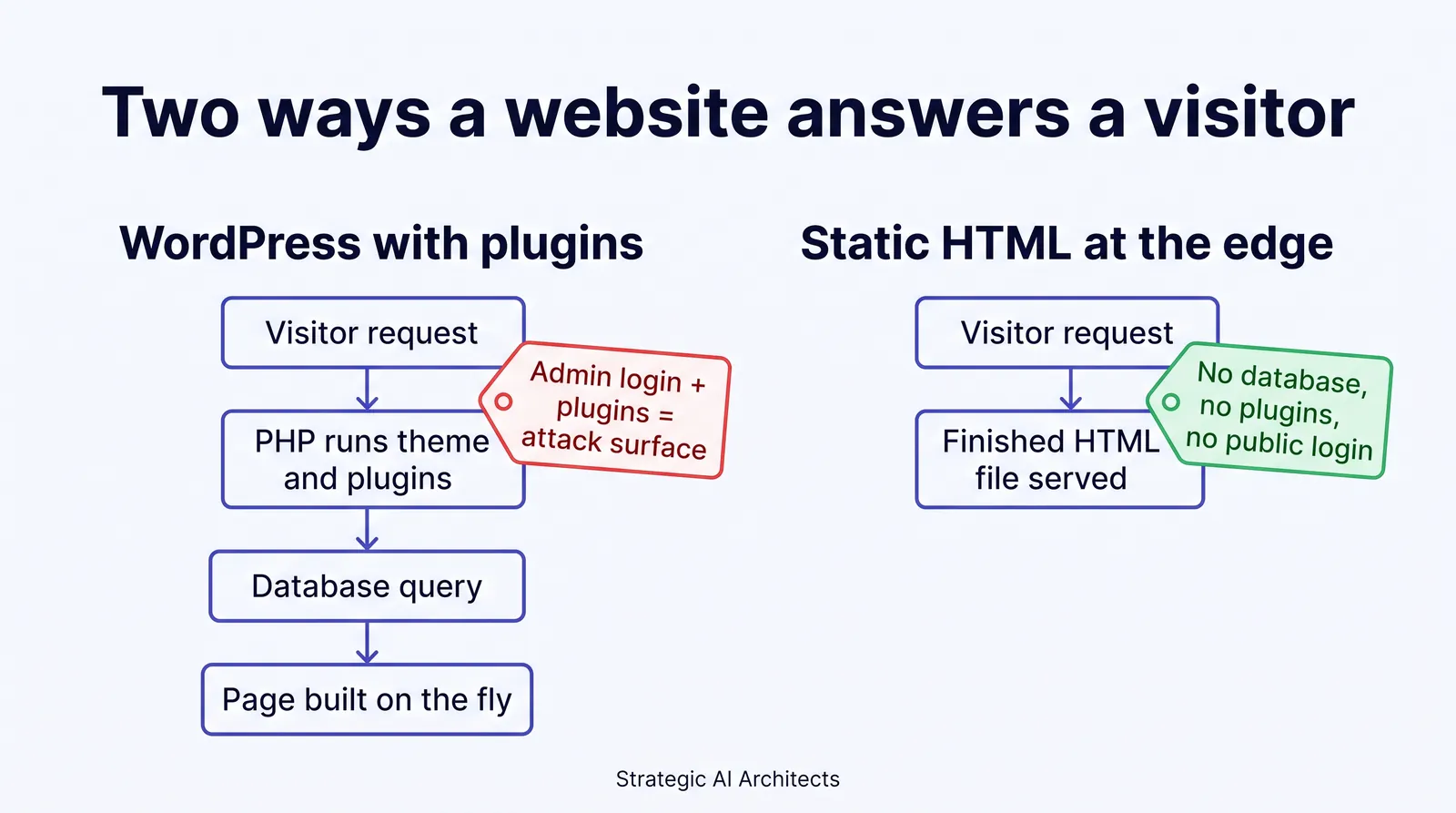
Walk the same visitor through both architectures. On WordPress, the request wakes up PHP, loads every plugin, and queries the database, so every one of those layers is something an attacker can send input to. On a static site served from Cloudflare Pages, which deploys to Cloudflare's global network and builds automatically from a Git repository,14 the request gets a file. There's nothing on the public site that takes input and runs a database query, because there's no database.
The typical agency WordPress site
- PHP and every active plugin run on each visit
- Database on the web server, often holding form entries
- Public login page at a predictable address
- Plugin, theme, and core updates owed every week
- Host firewall as the main line of defense
Patch dutyWeekly, for the life of the site
A static site at the edge
- Finished HTML files, built before publishing
- No database on the public site to inject into
- No public admin login on the site itself
- No plugin code executing on visits
- Forms post to a small function that forwards to your CRM
Patch dutyFramework and dependencies at build time only
What a static site doesn't fix
We'd be overselling it if we stopped there. A static site still has things to protect, and they're worth naming:
- The accounts behind it. Whoever controls the Git repository, the hosting account, and the domain's DNS controls the site. Two factor on all three is non negotiable.
- The form endpoint. Something still has to receive a quote request. On our builds that's a small serverless function that forwards to the CRM and doesn't keep a copy, but it's code, and it has to validate input.
- Third party scripts. A chat widget or analytics tag is someone else's JavaScript running on your page. Fewer is safer, and on health sites the tracking has to be consent gated anyway.
So the fair claim is this: a static architecture removes the attack paths behind most WordPress compromises, the plugins, the database, and the public login, and leaves a much smaller set of things to guard. It isn't magic. It's less.
The speed side effect
The same architecture that removes the attack surface is also why static sites are fast. Page builder platforms load a runtime and plugins before the content appears. Static HTML doesn't. That's covered in depth in our comparison of WordPress versus a static site for an insurance agency website, which looks at the speed side in detail. This guide is the security half of the same decision.
How we build agency sites with nothing to patch
We build insurance agency websites on Astro, which ships zero JavaScript by default, so pages arrive as finished HTML, and we serve them from the edge on Cloudflare. Our builds score 90+ on Lighthouse performance on mobile and desktop, and some score 100. This page is built the same way. We measured its production build with Lighthouse on September 28, 2026, before publishing: 100 for performance on desktop, and a median of 92 on mobile across five runs, with individual mobile runs between 89 and 97.
On the security side, what that means in practice for an agency is simple. There's no
WordPress dashboard for you to log into every week and no plugin list to audit. Quote forms
post to a function that hands the lead to your CRM rather than parking it on the web
server. The files crawlers need, llms.txt, sitemap.xml, and
robots.txt, are generated by the site and update themselves the moment a new
page or post goes live, with full absolute URLs, so nobody has to remember to edit them.
That's the website at the center of Digital Foundation, our done for you package for Medicare, health, life, and annuity agencies. Per the live pricing page, the website on its own is $84 a month, billed annually. Starter is $247 a month and adds Google Business Profile management, an AI chat widget, and 2 blog posts, 2 location pages and 2 answer pages a month. Pro is $497 a month and adds a new blog post, location page and answer page every week, review harvesting, and a 24/7 AI receptionist. Scale is $997 a month and publishes one of each every business day. Every plan starts with a 14 day free look period, and the page states the site is live by day 14.15
Moving off WordPress without losing rankings
Switching platforms doesn't have to cost rankings if every old URL gets a redirect to its new home; the process is in will switching websites cost your insurance agency rankings. For the money side, see what your insurance agency's website really costs.
What changes for your agency
The practical result of taking plugins and a public database out of the picture is that website security stops being a weekly chore and becomes an account hygiene question: two factor on the few accounts that control the site, and that's most of it.
No patch duty
No plugin list, no core updates, no staging copy to click through every week.
Less client data exposed
Leads go to your CRM instead of sitting in a web server database.
A smaller reporting problem
A site that stores no nonpublic information has far less to investigate if something goes wrong.
A faster site
Static HTML is also why these builds score 90+ on Lighthouse on mobile and desktop.
Crawl files that maintain themselves
llms.txt, sitemap.xml, and robots.txt regenerate with full URLs on every publish.
None of this promises you'll never have a security problem, and nobody honest will promise that. What it does is take the most common way agency websites get compromised off the table, rather than asking you to defend it forever.
Who this fits, and who's fine as is
It fits best if you're running an older WordPress site nobody maintains, if your quote forms collect health details, or if you're licensed in one of the model law states and would rather not find out what "72 hours from determination" feels like.
It matters less if your WordPress site is small, lean, and genuinely maintained weekly by someone who knows what they're doing. In that case, the hardening list above is the right move and a rebuild isn't urgent.
Questions agents ask about WordPress security
Is WordPress safe for an insurance agency website?
WordPress core is well maintained: Patchstack counted 6 core vulnerabilities in 2025 against 11,334 across the ecosystem, 91% of them in plugins. The risk comes from plugins, themes, the public login page, and whether anyone applies updates. A lean, updated site with few plugins and two factor login can be run safely. An abandoned one with a page builder and fifteen plugins is a liability.
How do I know if my agency's WordPress site has been hacked?
Start with Google Search Console's Security Issues report, where Google flags hacked content, malware, and deceptive pages. Then look for admin accounts, plugins, or pages you didn't create, and for redirects on mobile. Many infections hide from logged in admins, so test in a private window on a phone.
Does my state's insurance data security law apply to my website?
It can, if you're licensed in a state that adopted the NAIC Insurance Data Security Model Law. The model treats unauthorized access to an information system as a cybersecurity event and counts consumer health details as nonpublic information. A quote form storing names with conditions or medications holds exactly that. Your state's version controls, so confirm with your department of insurance.
I have fewer than 10 employees. Am I exempt from the insurance data security law?
Only partly. The NAIC model exempts licensees with fewer than ten employees, counting independent contractors, from Section 4, the written security program. It doesn't exempt them from Section 5, investigating a cybersecurity event, or Section 6, notifying the commissioner within 72 hours when the notice criteria are met.
Is a static website really more secure than WordPress?
It removes the most common attack paths instead of defending them. A static site built with Astro and served from Cloudflare delivers finished HTML, so there's no PHP per request, no database to inject into, no plugin code, and no public admin login. You still protect the Git account, DNS, form endpoint, and third party scripts. Less to guard, not nothing.
Should I rebuild my site or just harden the WordPress install I have?
If the site is small, someone updates it weekly, and forms send leads straight to your CRM, harden it. If nobody has logged in for months, it runs a page builder and a long plugin list, or quote forms collect health details, a rebuild usually costs less than the ongoing patch duty. Handle redirects properly and you keep your rankings.
Sources
- Patchstack. "State of WordPress Security in 2026" whitepaper, published February 25, 2026, covering 2025: 11,334 new vulnerabilities (up 42% from 2024); 91% in plugins, 9% in themes, 6 in WordPress core; 46% not fixed in time for public disclosure; weighted median time to first exploit of 5 hours; hosting defenses blocked 26% of total attacks and 12% of WordPress specific vulnerability attacks. Verified live 2026-09-28. patchstack.com.
- National Vulnerability Database (NIST). CVE-2026-19949, All-in-One WP Migration and Backup: SQL injection via archive restore in versions up to and including 7.109, unauthenticated, leading to remote code execution; CVSS 3.1 base score 8.8 (High) from Wordfence; published August 25, 2026; CVE ID reserved August 15, 2026; CISA coordinator SSVC entry dated August 27, 2026 lists exploitation "none", automatable "no". Verified live 2026-09-28. nvd.nist.gov.
- WordPress.org. All-in-One WP Migration and Backup plugin listing (5+ million active installations; version 7.111 updated September 15, 2026) and plugin version statistics API, pulled September 28, 2026: 7.111 at 34.64%, 7.110 at 10.32%, 7.105 at 5.26%, other versions at 49.78%. Verified live 2026-09-28. api.wordpress.org/stats/plugin/1.0/all-in-one-wp-migration; wordpress.org/plugins/all-in-one-wp-migration.
- WordPress.org Plugin Trac. Revision log for all-in-one-wp-migration tags: "Adding v7.110 to trunk and tags," August 20, 2026. Verified live 2026-09-28. plugins.trac.wordpress.org.
- WordPress.org. Core version statistics API, pulled September 28, 2026: 7.1 at 58.806%, 7.0 at 10.55%, 6.9 at 7.457%, 6.8 at 5.697%, 6.7 and older at 17.488% (5.x and older 7.688%); current release offered by the version check API: 7.1.2. Verified live 2026-09-28. api.wordpress.org/stats/wordpress/1.0; api.wordpress.org/core/version-check/1.7.
- W3Techs. "Usage statistics and market share of WordPress," September 28, 2026: WordPress is used by 40.2% of all websites and 58.7% of websites whose content management system is known. Verified live 2026-09-28. w3techs.com.
- National Association of Insurance Commissioners. "The NAIC Insurance Data Security Model Law," government affairs brief, August 2025: the model applies to insurers, insurance agents, and other licensed entities; 28 jurisdictions implemented as of the update (AL, AK, CT, DE, HI, IL, IN, IA, KY, LA, ME, MD, MI, MN, MS, MO, NH, ND, OH, OK, PA, PR, RI, SC, TN, VT, VA, WI); licensees with fewer than 10 employees, HIPAA compliant licensees, and agents of a licensee exempt from Section 4. Verified live 2026-09-28. content.naic.org.
- National Association of Insurance Commissioners. Insurance Data Security Model Law (#668), 2017: definitions of Cybersecurity Event, Information System, and Nonpublic Information (including health information other than age or gender); Section 6 notice to the commissioner no later than 72 hours from determination; 250 consumer threshold; Section 9 exemption from Section 4 for licensees with fewer than ten employees including independent contractors; drafting note on 23 NYCRR 500. Verified live 2026-09-28. content.naic.org.
- Google. Search Console Help, "Security Issues report": affected pages can appear with a warning label in search results or a browser interstitial; a review can take from a few days to a few weeks; issue categories include hacked malware, code injection, content injection, URL injection, and deceptive pages. Verified live 2026-09-28. support.google.com.
- Verizon. 2026 Data Breach Investigations Report: 31% of breaches now start with software vulnerabilities, overtaking stolen passwords as the top initial access route. Verified live 2026-09-28. verizon.com.
- IBM. Cost of a Data Breach Report 2026, conducted with the Ponemon Institute: global average breach cost $4.99 million, a 12% increase over the prior year and a record high. Verified live 2026-09-28. ibm.com/reports/data-breach.
- WordPress Advanced Administration Handbook. "Hardening WordPress": keep plugins updated, delete unused plugins, enable two step authentication, restrict file permissions, back up regularly including databases. Verified live 2026-09-28. developer.wordpress.org.
- Astro documentation. "Why Astro?": "Zero JS, by default" and "Server-first." Verified live 2026-09-28. docs.astro.build.
- Cloudflare. Cloudflare Pages documentation: applications deployed to the Cloudflare global network, with Git provider integration for deployments. Verified live 2026-09-28. developers.cloudflare.com/pages.
- Strategic AI Architects. Digital Foundation pricing page: Website $84/mo billed annually (complete site with 30 pages live on Launch Day, calculators and widgets, AI CLI access, monthly report); Starter $247/mo (adds 2 blog posts, 2 location pages and 2 answer pages a month, Google Business Profile management, AI chat widget); Pro $497/mo (adds 1 blog post, 1 location page and 1 answer page every week, up to 4 languages, review harvesting, 24/7 AI receptionist); Scale $997/mo (adds 1 of each every business day, up to 10 custom pages, monthly newsletter); Full Clone, Update and Handoff $1,000 one time; 14-day free look period. Verified live 2026-10-12. strategicaiarchitects.com/digital-foundation.
See where your own site stands
Run a free Audit and see how your site scores for speed, AI citations, and HIPAA safe tracking, in about a minute.
Related reading: WordPress vs. static site for an insurance agency website · What your insurance agency's website really costs · GoHighLevel website vs. custom built site