Playbook
Your Quote Form Doesn't Actually Quote Anything
It says "Get a Quote." It collects a name, an email, and a phone number, then thanks the visitor and goes quiet. Nothing on that page knows what this specific person would actually pay. A real quoter does, and the difference is a live call to a government data source instead of a guess.


18 min read
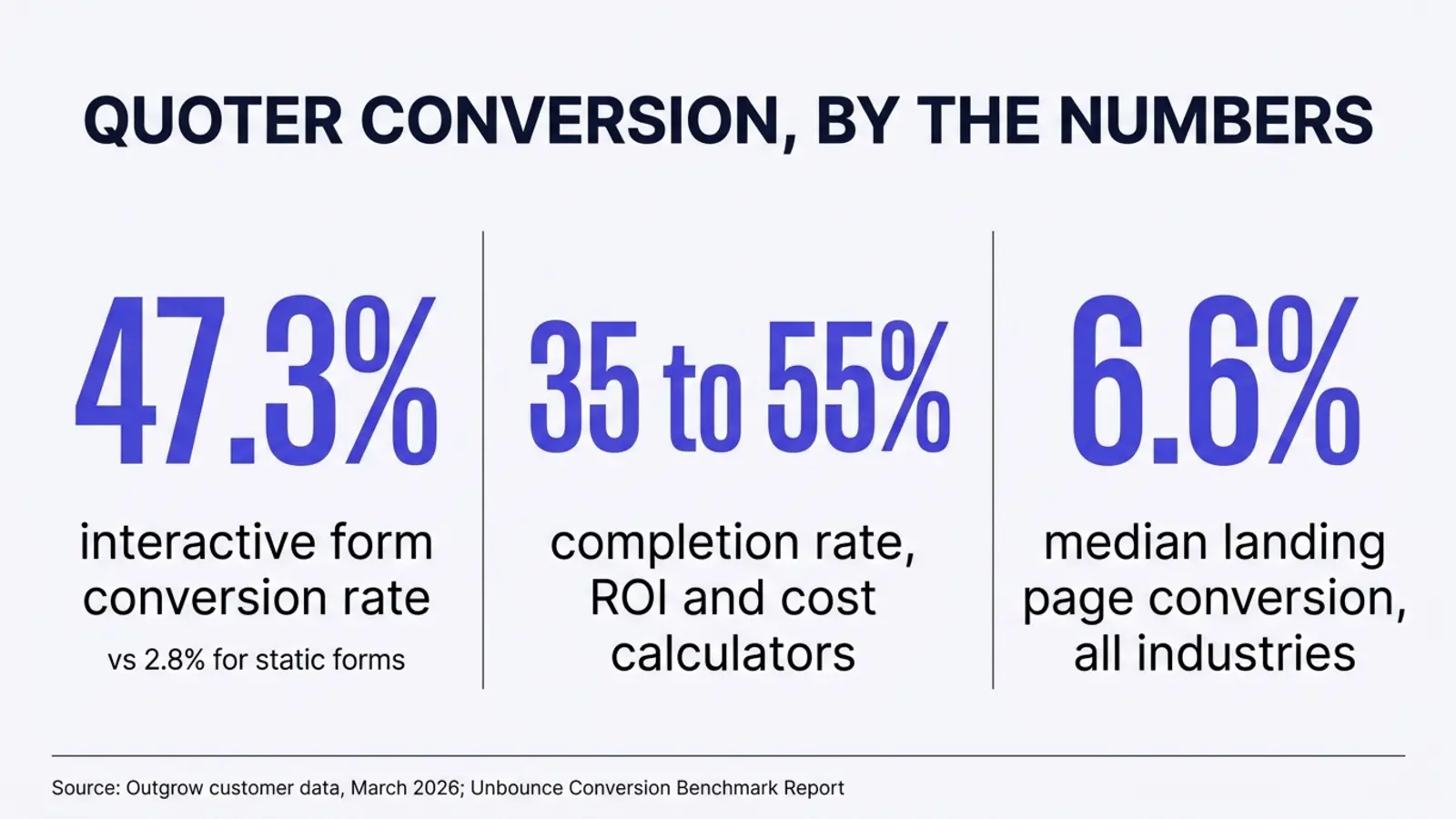
Most agency "quote" forms don't quote anything. They collect contact information and wait for a human to call back with a guess. A real quoter calls a live data source, such as the federal Marketplace API that powers HealthCare.gov itself, and returns an actual premium and subsidy estimate before the visitor leaves the page.1 Interactive tools convert at 47.3% on average against 2.8% for static forms, per one vendor's own analysis of its customers' campaigns,2 and ROI or cost calculators specifically complete at 35 to 55%.2 The median landing page across all industries converts at 6.6%, for comparison.3 Building the real version means touching a government API, not a page builder's form widget, and the API itself warns that it's built for live lookups, not for scraping.1
The button that says quote and doesn't
Pull up your own site on your phone right now and find the button that says "Get a Quote" or "See Your Price" or "Check Your Rate." Tap it. On most independent agency sites, here's what happens next: a short form asks for a name, an email, a phone number, and maybe a ZIP code. There's a submit button. There is no premium anywhere on the screen. The page thanks the visitor and tells them someone will be in touch.
That's not a quote. It's a callback request wearing a quote's name. The visitor typed "quote" into Google because they wanted a number, today, without talking to anyone yet. What they got instead was a form that turns their question back into a chore: wait by the phone, or wait for an email, for a number a human will eventually type in by hand, usually pulled from memory or a rate sheet that may or may not reflect this year's numbers for this exact county.
Agents don't build it this way out of laziness. A real quote, the kind the Marketplace itself would generate, depends on inputs an agent can't always verify instantly, a precise household income, an exact birthdate, a specific rating area. So the honest, safe move has always been to collect contact information and have a licensed human work the number out properly before quoting anything in writing. That instinct is correct for a binding enrollment. It's the wrong default for the first thirty seconds a prospect spends on your site, when all they want is a realistic range to decide whether to keep looking.
The timing makes this worse, not better. AEP opened October 15 and runs through December 7, the single heaviest search window most Medicare and ACA agency sites see all year. Every one of those searchers is actively comparing options right now, often across three or four agency sites in the same sitting. The site that answers "what would this actually cost me" first keeps that visitor's attention a little longer than the one that asks for a phone number before answering anything.
It's worth being specific about who this does and doesn't apply to. A final expense or life policy's price depends heavily on underwriting, health questions a form can't answer with a ZIP code and a birthdate, so a live rated estimate matters less there, and a simple contact form is a reasonable choice. ACA and Medicare Advantage are the opposite case. Both are rated on factors a visitor already knows about themselves, age, location, household size, and for ACA, income, which means both are rateable the moment someone lands on the page, with no underwriting required first.
Try this before you keep reading
Open your own "Get a Quote" page in another tab. Time how long it takes from landing on the page to seeing an actual dollar figure anywhere on the screen. If the honest answer is "never, until someone calls," you're reading about your own site for the next few minutes. If you'd rather have someone else look first, the free Audit scores your site's speed, AI citations, and HIPAA safe tracking in about a minute.
There's also a quieter version of this problem, where a page does show a number, but the same number to everyone: "Plans starting at $0 a month." That claim can be literally true somewhere in the country and still be useless to the specific person reading it, because $0 a month plans exist for specific households at specific income levels in specific counties, not as a universal starting price. A visitor who doesn't qualify for that number has just been told something true and irrelevant, which erodes trust about as fast as something false would.
What actually makes a quoter a quoter
The difference between a form and a quoter isn't visual polish. A form with a nicer font and a progress bar is still a form. What makes a tool a real quoter is a single structural fact: its output depends on a live lookup against current data, not on a number someone typed into the page's HTML last year.
A static "quote" page typically shows one of two things: a range pulled from memory and never updated ("plans starting at $0 a month"), or nothing at all until a human calls back. Both are decorative. The number on the page, if there is one, isn't computed from anything the visitor told you. It's the same number every visitor sees, regardless of their county, their age, or their income.
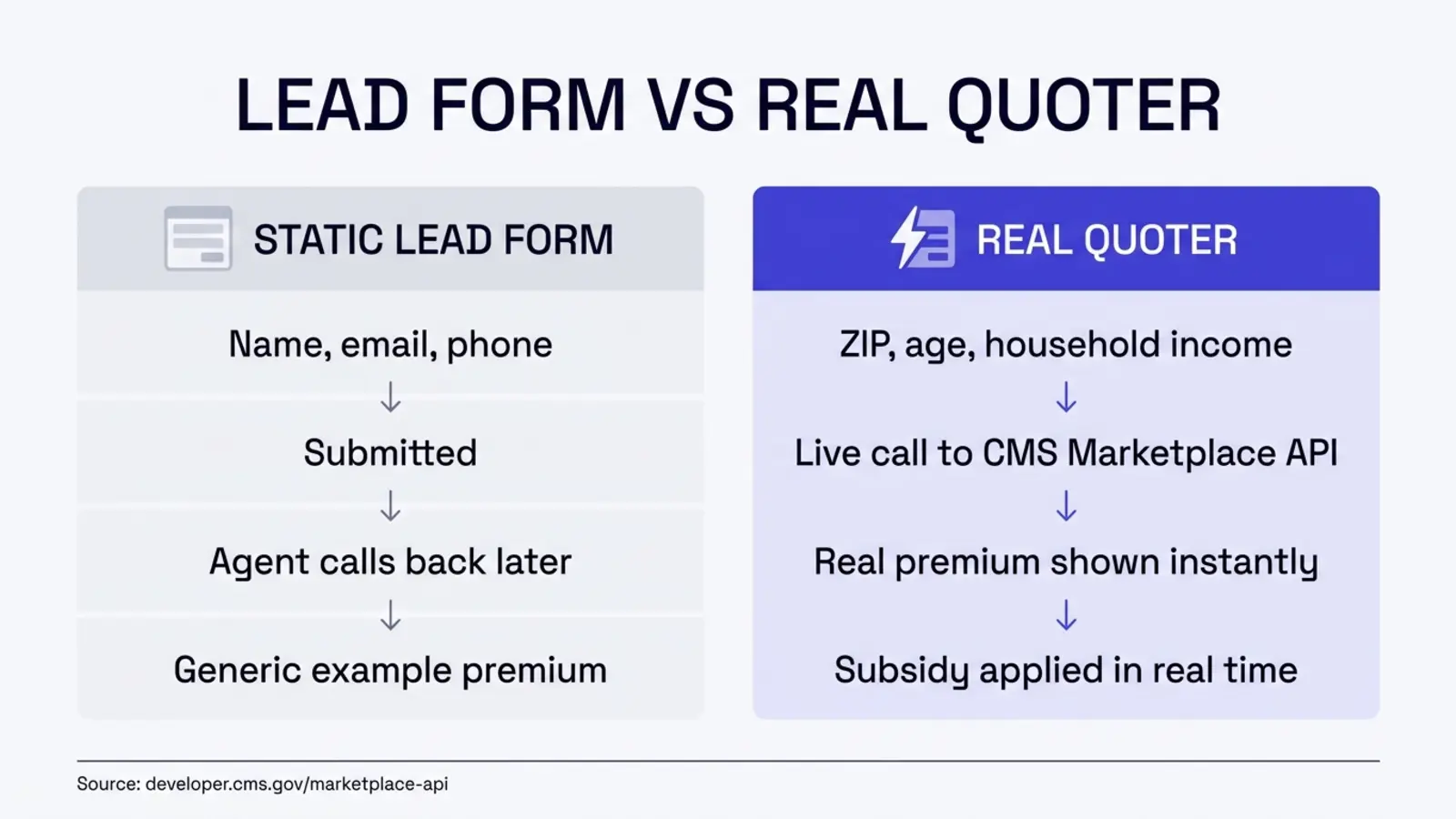
A real quoter takes a small set of inputs, typically a ZIP code, a birthdate or age, a household size, and a projected income, and sends them to a backend that calls a live data source. The response comes back with plan options, premiums, and in the case of ACA coverage, a subsidy estimate specific to that household, in the same browser session, before the visitor has given you a phone number or an email address.
The decorative form
- Asks for name, email, phone first
- Shows no number, or a generic example premium
- Output is identical for every visitor
- A human looks up the real number later
- Nothing on the page calls a live data source
What the visitor learnsNothing, until someone calls back
The real quoter
- Asks for ZIP, age, household size, income
- Calls a live federal data source in the same session
- Output is specific to that household
- A licensed agent finalizes enrollment afterward
- Contact info is asked for after value is delivered
What the visitor learnsAn actual premium and subsidy estimate, now
The live data behind a real quoter
For ACA coverage specifically, the data source that makes this possible already exists, and it's the same one that powers HealthCare.gov's own plan comparison tool. CMS runs a public Marketplace API, documented at developer.cms.gov, that delivers ACA plan benefit and rating data directly from issuers on the exchange, provider and drug coverage information tied to specific plans, out of pocket cost calculations, and Medicaid and CHIP eligibility estimates.1 This isn't a third party's reverse engineered scrape of public pages. It's the actual dataset the federal Marketplace itself runs on, opened up for other applications to call.
Getting access isn't a credit card transaction. CMS's own documentation describes a request process for an API key rather than a published price, which is why most agencies who've heard of this API have never actually built against it: there's no self serve signup button, just a request form and a wait.1 Once issued, a key expires every 60 days and a new one arrives automatically by email, which means whatever system calls this API needs a process for swapping the key on a schedule, not a "set it and forget it" integration.1
One line in CMS's own documentation is worth repeating exactly, because it tells you how this API is meant to be used: it's "designed to support live access by front end applications," and explicitly "not designed to be scraped or for the whole data set to be extracted."1 That's the whole philosophy of a real quoter in one sentence. You don't download ACA plan data once and bake it into your site as a static table that goes stale the next time a carrier files a rate change. You call the API live, every time a visitor asks, and the answer is only ever as old as the moment they asked it.
| Data category | What it's used for |
|---|---|
| ACA plan benefit and rating data | The actual premiums and benefit structures issuers filed for the exchange, by plan and rating area. |
| Doctor, facility, and drug coverage | Whether a specific plan covers a specific provider, facility, or medication. |
| Out of pocket cost estimates | Projected yearly costs based on care utilization, not just the sticker premium. |
| Medicaid and CHIP eligibility estimates | Flags households who may qualify for Medicaid or CHIP instead of a marketplace plan. |
Medicare Advantage runs on different endpoints
Everything above describes ACA coverage specifically. Medicare Advantage plan data, benefit packages, star ratings, service areas, lives in its own separate CMS datasets, built around plan structure rather than income based subsidies. A Medicare quoter and an ACA quoter solve the same problem for the visitor, an instant real number instead of a callback, but they're built against different federal data sources.
A worked example of why the inputs matter
This is a simplified, illustrative walkthrough of the mechanism, not actual plan data from any real county or carrier. Picture two visitors landing on the same agency's ACA page in the same hour. Household A is a 62 year old in a rural county with a household income near 150% of the federal poverty line. Household B is a 29 year old in a dense urban county with income near 300% of the federal poverty line. A static "plans starting at $0 a month" banner tells both of them the same thing. A real quoter, calling the Marketplace API with each household's actual ZIP, age, and income, returns two different rating areas, two different sets of available plans, and two different subsidy calculations, because the underlying inputs, where they live and what they earn, are genuinely different.
Neither household learns anything false from the static banner. They learn nothing specific at all, which is a quieter failure than being wrong, but it's still a failure. The $0 a month plan that's real for Household A at 150% of the poverty line may not exist, or may look nothing like the plan Household B would actually qualify for. A page that can't tell the two of them apart was never actually quoting either one.
What the fake version costs you
Nobody has published a conversion rate benchmark specifically for insurance agency quote forms, and it would be dishonest to hand you one that doesn't exist. What does exist, sourced and dated, is the gap between static forms and interactive tools generally, and it's large enough that it's worth taking seriously even without an insurance specific number.
Unbounce's own Conversion Benchmark Report, built from more than 464 million pageviews across over 41,000 landing pages and 57 million recorded conversions covering roughly a year of traffic through mid-2024, puts the median landing page conversion rate at 6.6% across all industries.3 That's every kind of landing page, lead forms included, averaged together. It's a reasonable floor for what an ordinary "fill this out and we'll call you" page achieves.
Outgrow, a company that builds interactive content tools including calculators, published its own analysis of more than 10,000 real interactive experiences run by its customers between 2024 and 2026, and reported that interactive forms converted at an average of 47.3%, against 2.8% for static forms, a gap the company itself frames as a 16.9 times improvement.2 Its same data put completion rates for ROI and cost calculators specifically at 35 to 55%.2 That figure comes from one vendor's own customer data, and we couldn't locate an independent second source reporting the same number, so treat it as directional rather than a universal law. It's also exactly the kind of company with a reason to publish a flattering number about interactive tools, since it sells them.
47.3%
Average conversion rate for interactive forms, per Outgrow's own customer data2
2.8%
Average conversion rate for static forms in the same dataset2
35 to 55%
Completion rate for ROI and cost calculators specifically2
60 days
How often a CMS Marketplace API key expires and has to be reissued1
What that gap actually costs an agency isn't a lead count or a revenue figure, because nobody can source one specific to insurance quote forms honestly. It's simpler than that. Every visitor who leaves your site without seeing a real number was a candidate for an instant answer, and got a chore instead. Some of them will call anyway. Most will open another tab and try a competitor, or an aggregator site that does show a number, even if that number comes from a less trustworthy source than a licensed local agent.
What this isn't
This isn't a promise that building a real quoter will produce a specific lift in your own conversion rate, your own lead count, or your own revenue. Nobody can source that number for your specific site in advance, and anyone who tells you they can is guessing. What's sourced here is the general gap between static and interactive tools, and the fact that a federal data source exists to build the real version against.
Check your own site in five minutes
This doesn't require a developer or a login to anything. It takes about five minutes on your phone.
1. Find your quote page
Whatever your main navigation calls it, "Get a Quote," "Free Quote," "Check Your Rate," open it on your phone, the way most of your prospects will.
2. Fill it out as a stranger would
Use a real ZIP code and a plausible age. Submit it. Time how long it takes to see an actual dollar figure anywhere on the resulting screen.
3. Note what the page actually asked for
A real quoter needs enough information to compute something: a location, an age, a household size, and for ACA specifically, an income. If your form only asks for contact information, it structurally cannot show a real number, because it never collected the inputs a real number would require.
4. Check whether the number, if any, changes
Submit the form twice with two different ZIP codes and two different ages. If the number on screen doesn't change, or there was never a number to begin with, you've confirmed it: the page is a lead form with a quote's name on it.
Curious what else your site is quietly getting wrong
This same five minute habit, checking what a page actually does instead of assuming, is worth applying past the quote form. The free Audit runs a similar check automatically across speed, AI citation readiness, and HIPAA safe tracking.
How to build a real one
None of this is exotic engineering, but none of it fits inside a page builder's drag and drop form widget either. A GoHighLevel funnel form, a WordPress plugin, or a Squarespace block can collect inputs and submit them somewhere. None of them can authenticate against a government API, hold a key that rotates every 60 days, or return a computed result in the same request cycle, because that's backend logic, not a form configuration option. Here's the actual sequence.
| Step | What it involves | Effort |
|---|---|---|
| 1. Request API access | Request a Marketplace API key through CMS's developer portal at developer.cms.gov. | A form and a wait, not a purchase |
| 2. Build the input form | Collect ZIP, birthdate, household size, and projected income, the minimum inputs the API needs to return a rated estimate. | Standard form development |
| 3. Call the API server side | Send the inputs to the Marketplace API from your backend, never directly from the visitor's browser, so the API key stays private. | Real backend development |
| 4. Render the response | Map the returned plan, premium, and subsidy data into a readable comparison on screen, in the same visit. | Frontend development |
| 5. Handle key rotation | Build a process for swapping the API key when it expires every 60 days, so the tool doesn't silently go dark. | Ongoing, light maintenance |
| 6. Ask for contact info last | Request a name, email, or phone number after showing the estimate, as a way to save or discuss it, not as a toll gate before any value is delivered. | A sequencing decision, not a technical one |
Step six is the one agencies skip most often, and it's the one that costs the least to fix. Moving the contact form to after the estimate instead of before it doesn't require touching the API integration at all. It requires deciding that the visitor has earned something before you ask them for something.
The subsidy math itself, step four's hardest part, isn't a secret formula. It compares a household's projected income against the federal poverty line for their household size and state, then applies a sliding scale that the Marketplace recalculates on its own schedule each year to determine how much of the benchmark plan's premium the household is expected to pay versus how much gets covered by the credit. The Marketplace API returns this calculation already done. The work on your end is collecting clean inputs, income especially, since a wrong income produces a wrong subsidy regardless of how correct the underlying math is, and displaying the result in a way that's honest about being an estimate rather than a locked in number.
When a simple form is actually fine
Not every agency needs this, and it's worth saying so plainly rather than pretending every site is one build away from disaster. If your book is mostly referral and repeat business, and your website exists mainly so people can confirm you're a real operation before they call someone they were already going to call, a live quoter solves a problem you don't particularly have. The gap this closes matters most for cold, comparison shopping traffic, someone who found you through a search and is deciding among several agencies in the same sitting. If that's not most of your traffic, a simple contact form is a reasonable choice, not a mistake.
It's also fine to build this in stages. A form that at least shows a real, sourced range for the visitor's state, "ACA benchmark plans in your state ranged from X to Y this year, per HealthCare.gov," is a meaningful step up from a generic banner, even before you've built a fully personalized, API driven calculator. Perfect is not the bar. Honest and specific to the visitor is.
How we build this in
This is the kind of build we do for agencies directly: real quoters and calculators wired to live government data, built on your own accounts and your own domain, HIPAA safe by design rather than bolted on afterward. It's listed plainly on our own custom build page as one of the things we build, Medicare and ACA tools that call live federal data instead of displaying example numbers.4
We scope a build like this on a strategy call rather than selling it as a fixed package, because the honest price depends on what you're actually asking for: an ACA premium estimator is a different scope than a Medicare Advantage plan comparison tool, and a tool that also checks Medicaid and CHIP eligibility is a different scope again. What stays constant is the ownership model. Whatever gets built runs on your own accounts and your own domain, and it keeps working whether or not you keep working with us.4
For the health data question specifically: when protected health information has to move through a system that isn't itself HIPAA compliant, Ambrose's PHI Rail masks the sensitive fields before a non-BAA model ever sees them, then restores the real data on the way back out.4 A premium quoter built this way can use modern AI components for the parts that benefit from them, like explaining a plan comparison in plain language, without routing raw health details through a model that was never contracted to handle them.
Household income and the HIPAA safe tracking rule
Income alone isn't protected health information. But a page where a visitor enters income and shows clear interest in a specific health or Medicare plan sits close enough to health information that it should get the same treatment as every other health adjacent page: server side, consent gated analytics, not a client side pixel firing before anyone has agreed to anything.
There's a second payoff to building this correctly that has nothing to do with conversion rate. A quoter whose output is structured data, a plan name, a premium, a subsidy amount, a source, rather than a sentence of marketing copy, is exactly the kind of content an answer engine can read, trust, and quote. The same discipline that makes a page citable, named data, a stated source, a real result instead of a guess, is what makes a quoter worth building in the first place. It isn't a coincidence that the fix for a decorative form and the fix for an uncitable page are the same fix: stop publishing a number nobody can trace back to anything.
What changes for your agency
None of this is a guarantee about your specific traffic or your specific conversion rate. It's a structural change in what happens in the thirty seconds after someone clicks "Get a Quote."
A real answer, not a callback promise
The visitor sees a premium and subsidy estimate specific to them, in the same session.
Data that can't go stale on its own
Every quote is computed live against current federal data, not a number baked into the page last year.
Contact info asked for after value, not before
The form sequence matches how a trustworthy tool, not a toll gate, actually behaves.
HIPAA safe handling by default
Sensitive inputs are treated as health adjacent from the first build decision, not patched in later.
You own the build
It runs on your accounts and your domain, and keeps working on its own.
Questions agents ask
What's the actual difference between a lead form and a real quoter?
A lead form collects contact information and stores it. Nothing it does depends on who the visitor is or what they qualify for. A real quoter takes the visitor's own details, a ZIP code, an age, a household size, an income, and uses them to call a live data source that returns a number specific to that person, before they've given you their phone number. One captures a lead. The other answers a question.
Is the CMS Marketplace API free to use?
CMS's own developer documentation doesn't list a price, and getting an API key is a request process rather than a purchase. It isn't free in the sense of effortless, though: you request access, build against the data categories it exposes, such as ACA plan benefit and rating data and Medicaid and CHIP eligibility estimates, and handle the fact that keys expire every 60 days and have to be reissued.
Does a real quoter replace the need for a licensed agent to finalize enrollment?
No, and it shouldn't claim to. A live quoter shows an estimate built from the same rating factors the Marketplace uses, ZIP, age, household size, projected income. Actual enrollment still runs through a licensed agent or the Marketplace itself, where income gets verified and the final subsidy amount gets locked in. The quoter's job is to replace the guess with a real number earlier, not to replace the agent.
What happens when the API key expires every 60 days?
Per CMS's own documentation, a new key arrives by email automatically when the old one expires, so the renewal itself isn't manual. What has to be manual is updating wherever the key is stored in your site's configuration and confirming the swap didn't break anything, which is exactly the kind of maintenance task that gets missed on a site nobody is actively developing.
Is asking for household income and showing a health plan premium a HIPAA concern?
Income by itself isn't protected health information. But a page that collects income alongside clear interest in a specific health or Medicare plan sits close enough to health information that the same rule we apply everywhere else on a health adjacent site applies here too: analytics and tracking on that page should be server side and consent gated, not a client side pixel firing on every keystroke before anyone has agreed to anything.
Can I build this myself, or do I need a developer?
You need someone who can write code against an API and handle an authentication key, which rules out a page builder's drag and drop form tool. It doesn't require a large team. The actual logic, take a ZIP and household details, call the Marketplace API, map the response to a displayed premium and subsidy estimate, is a few hundred lines of real work, not a months long platform build.
Does this work the same way for Medicare Advantage as it does for ACA?
The mechanism is the same, a live call to a data source instead of a static number, but the source is different. ACA premium and subsidy estimates run through the CMS Marketplace API described here. Medicare Advantage plan data has its own separate CMS datasets and APIs, built around plan benefit packages, star ratings, and service areas rather than income based subsidies, so a Medicare quoter and an ACA quoter are built against different endpoints even though they solve the same problem.
My current lead form already converts fine. Do I still need this?
If it converts fine and you're comfortable with what it's actually capturing, a working form isn't broken. What's worth checking honestly is what 'converts fine' means: a form that gets filled out by people who were going to call you anyway isn't the same as a tool that turns a browsing stranger into a qualified conversation because it answered their question before they left the page.
Sources
- Centers for Medicare and Medicaid Services. "Marketplace API," CMS developer documentation: delivers ACA plan benefit and rating data from exchange issuers, provider and drug coverage data, out of pocket cost estimates, and Medicaid/CHIP eligibility estimates; API keys are issued on request and expire every 60 days, reissued automatically by email; the API is explicitly "designed to support live access by front end applications," not for scraping or full dataset extraction. Verified live October 3, 2026. developer.cms.gov/marketplace-api.
- Outgrow. "User Engagement Benchmarks for Interactive Experiences," published March 18, 2026: based on Outgrow's own analysis of more than 10,000 real interactive experiences run by its customers between 2024 and 2026; interactive forms convert at an average of 47.3% against 2.8% for static forms; ROI and cost calculators complete at 35 to 55%. Single sourced to Outgrow's own customer data; no independent second source was found reporting the same figures. Verified live October 3, 2026. outgrow.co/blog/user-engagement-benchmarks.
- Unbounce. "Conversion Benchmark Report": median landing page conversion rate of 6.6% across all industries, drawn from more than 464 million pageviews, over 41,000 landing pages, and 57 million recorded conversions over roughly a year of traffic through mid-2024. Verified live October 3, 2026. unbounce.com/conversion-benchmark-report.
- Strategic AI Architects. Custom build page: lists real quoters and calculators built on live government data for Medicare and ACA as part of its custom build scope; builds run on the client's own accounts and domain and keep working independently afterward; Ambrose's PHI Rail masks protected health information before a non-BAA model processes it, then restores it on output. Verified live October 3, 2026. strategicaiarchitects.com/ai-expert.
Talk it through
Want a second pair of eyes on it?
Free 30 minutes. Bring what you found, or bring nothing and we will look together at how AI engines read your site and which fixes move first.
See what else your site is only pretending to do
Run a free Audit and see how your site scores for speed, AI citations, and HIPAA safe tracking, in about a minute.
Related reading: Why your subsidy calculator is already wrong · Why cost per lead keeps climbing · Getting cited by AI in 2026